A Small Spin You Can Trust: What Crossing Buttons Teach VR About Saying Yes
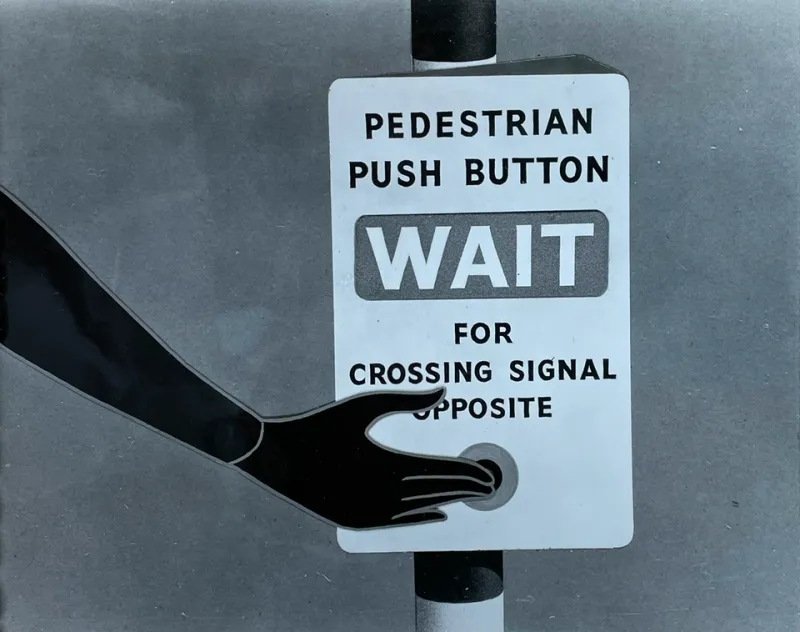
Photo: Unknown authorUnknown author, Public domain, via Wikimedia Commons
It is raining, the pavement is doing its usual impression of a shallow river, and you are standing at a crossing with one hand on the button. You press. Under your thumb, something small begins to turn. Not a beep. Not a screen. A little cone, spinning beneath the palm, telling you that the system has heard you and is getting on with it.
That tiny mechanical cue is one of the most quietly effective haptic interfaces in Britain. It is also a useful corrective for anyone designing touch in VR. We spend a lot of time in immersive tech talking about confirmation as a pulse: a short buzz, a tick, a vibration that says well done, you pressed a thing. The crossing button suggests a better question. What exactly are we confirming, and does the hand really need to be told everything?
The cone is not a receipt for your finger
On many UK pedestrian crossings, the tactile cone under the button unit rotates when the green man is lit. For blind and partially sighted pedestrians, it is a non-visual signal that the crossing is ready. It is tempting to describe it as a receipt for the press. It is more interesting than that. It is a receipt for the state of the system.
That distinction matters. A press can be acknowledged in lots of ways: a click, a light, a beep, a brief vibration. But acknowledgement is not the same as permission. The cone does not simply say I felt that. It says the crossing has moved into a different phase. It is a confirmation of readiness, not a pat on the finger.
VR controls often collapse those states into one generic buzz. You press a virtual button, the controller pulses, and you are left to work out whether the action was registered, whether it is pending, whether it succeeded, or whether nothing happened at all. The crossing button avoids that ambiguity by tying the tactile cue to a meaningful change. The hand is not being congratulated. It is being informed.
Why a simple mechanical cue survives
The cone is not clever in the way a haptic glove is clever. There is no firmware update, no app, no calibration routine. It is a small piece of engineering that has to work in British weather, on busy streets, for people with very different levels of touch sensitivity. That is exactly why it is worth studying.
It uses rotation rather than vibration. It is local, sitting right under the part of the hand that made the request. It is discoverable by touch alone. And it does not demand visual attention, which is the whole point of an accessible cue. The best haptic design often feels less like a notification and more like a small mechanical fact.
There is a lesson here for VR hardware. Controllers can buzz, tick and rumble, but they cannot yet rotate a cone under your thumb. That does not mean the principle is out of reach. A persistent tactile state, a change in texture, a soft detent that stays active while a target is locked: these are all ways of saying the system has moved, not just that your finger arrived.
Urgency without turning up the volume
Crossings are full of mild urgency. You want to cross. The traffic wants to move. The system has to be clear without being shouty. The cone manages this by being unmistakable rather than intense. It does not need to buzz harder to tell you something important is happening.
VR design often gets this wrong. When a virtual interaction matters, the temptation is to make the haptics stronger, faster and more dramatic. But intensity is not information. A stronger buzz can just feel like a louder version of the same vague message. A steady, well-placed state change can be calmer and more useful.
Think about grabbing an object in VR. A single pulse tells you the controller has fired. A short, repeatable tick while the object is held tells you the grip is still active. A clear stop tells you it has been released. That is closer to the crossing button than a one-off rumble. The hand gets a running answer, not a meaningless receipt.
The hand is not a notification tray
Accessibility raises the stakes. For deafblind users, touch may be the primary channel, so haptic clarity is not a nice extra. It is the interface. But that does not mean every micro-interaction should be confirmed with a buzz. Overloading the hand is its own kind of inaccessible design.
The crossing button is disciplined. It saves its tactile message for a state that matters: it is safe to cross. It does not narrate every internal step. VR designers could borrow that discipline. Reserve haptics for permission, completion, boundaries, errors and other changes the user genuinely needs to feel. Let audio and visuals carry the small stuff.
That is especially important in hand tracking, where there is no controller to buzz and no physical button to press. If every pinch and point gets a haptic reward, the hand becomes a notification tray. If haptics are used sparingly, a small cue can feel like a real answer.
Designing the virtual cone
The practical takeaway is not to imitate a rotating cone literally. It is to design confirmation as a state you can feel. Anchor the cue to the control, not the whole hand. Make it persistent while the state is active. Give different states different tactile signatures: pending, accepted, complete, blocked. And test with people who rely on touch, not just people who find buzzes novel.
In 2026, haptic accessories are multiplying, from gloves to vests to controller add-ons. That makes the crossing button look almost quaint. But quaint is not the same as out of date. The little cone understands something that many immersive interfaces forget: a good confirmation is not the loudest thing in the hand. It is the clearest thing in the system.
Next time you are waiting at a British crossing in the rain, pay attention to that small spin under your palm. It is not trying to impress you. It is trying to tell you the truth. VR could do with more of that.