The Kerb Is the Interface: What Blister Paving Knows That VR Doesn't
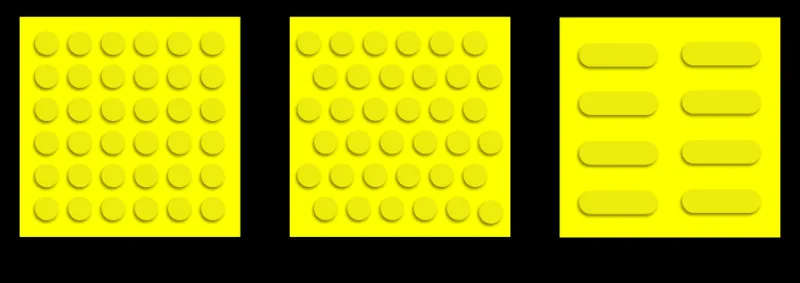
Photo: Ice-cold121, CC BY-SA 4.0, via Wikimedia Commons
There is a moment, on almost any high street in Britain, when a person stops reading the world with their eyes and starts reading it with their feet. A small change in texture underfoot — a grid of raised bumps, a strip of parallel ribs — and the body adjusts: slow down, straighten up, wait here, step there. No screen, no notification, no battery. Just a kerb doing the work of an interface.
We tend to talk about haptics as a young discipline, something that arrived with controllers and headsets and phones that buzz politely in a pocket. But the pavement outside your local station has been running a haptic system since before most of us had a mobile phone. It is one of the most widely used tactile interfaces in the country, and almost nobody who uses it thinks of it as technology at all. That is precisely what makes it worth stealing from.
A vocabulary you already know without knowing it
The system is not random. Blister paving — the dome-shaped bumps you find at pedestrian crossings — is a warning: you are about to enter the road. Corduroy paving, with its raised parallel bars, means a platform edge or a change in level, and it is the reason so many people find their way along a train platform without looking down. There are lozenge shapes for cycle routes, and other profiles for guidance and direction. Each one is a word in a sentence that runs for miles.
What is striking is how much of this vocabulary is absorbed rather than taught. Blind and partially sighted people often learn it formally through mobility training, but the rest of us pick it up by osmosis — a foot feels something different, the body slows, and we file the information away without ever naming it. That is the dream of any interaction designer: a language that becomes invisible because it is useful.
"The best tactile paving doesn't announce itself," one accessibility consultant told me recently, paraphrasing a point she makes in workshops. "It just quietly tells you where you are. If you notice it, something has usually gone wrong." That line has stayed with me, because it is the exact opposite of how most haptic tech behaves. We build feedback that demands attention — a jolt, a pulse, a rumble — and then wonder why people turn it off after a week.
Where the pavement gets it wrong
None of this is to pretend the system is perfect. Anyone who has navigated a British street in winter knows the failure modes. Blister paving gets buried under leaves, snow or badly placed A-boards. Temporary works leave routes blocked with no tactile alternative. Some newer shared spaces have removed the kerb entirely, taking away the clearest cue of all, and replaced it with ambiguous surfaces that ask pedestrians and vehicles to negotiate with eye contact and guesswork. Campaigners have been pointing this out for years, and they are right to.
There is also a consistency problem. Walk between two councils and you can find the same texture used for slightly different things, or the same hazard marked in two different ways. The vocabulary exists, but the grammar wobbles. For anyone designing a haptic language — in VR, in a car, in a museum — that is the cautionary tale. A cue is only learnable if it means the same thing in the next street, the next app, the next headset.
Translating pavement logic into VR
So what would it look like to borrow from the kerb rather than the spec sheet? A few principles stand out.
First, map one meaning to one sensation. Blister paving never means 'probably a crossing'. It means crossing. VR haptics often drift towards decorative rumble — a little buzz for a menu, a bigger buzz for an explosion — without a stable dictionary underneath. Borrow the discipline: decide what a short tick means, what a slow pulse means, and then never use those signals for anything else.
Second, design for the foot, not just the hand. Most VR haptics live in controllers, but the pavement reminds us that the body is a large, sensitive instrument. Vest feedback, floor-based rumble, even a subtle change in a seated platform can carry information that a controller never will. The corduroy strip works because it is encountered by a moving body at walking pace. VR has its own paces — a slow exploration, a fast traversal — and cues should be tuned to them.
Third, let quiet be part of the language. The pavement is silent for most of its length. Silence is not a failure of feedback; it is the baseline that makes the important signals legible. If everything vibrates, nothing does. A good haptic scene has long stretches of nothing at all, punctuated by cues that mean something.
Fourth, test with the people who rely on it. Tactile paving improved because blind and partially sighted users campaigned, fed back and refused to accept a system that only half worked. VR teams often test haptics in a lab with sighted colleagues for twenty minutes and call it done. The pavement's lesson is that a haptic language only proves itself over time, in the hands and feet of people who need it.
A short checklist for the pavement-minded designer
- One sensation, one meaning. Write the dictionary down before you build the scene.
- Learnable in seconds, consistent for hours. If a new user can't infer it in a minute, simplify it.
- Tune to pace. A walking cue is not a running cue; a seated cue is not a standing one.
- Use silence deliberately. Absence of feedback is information, not a gap.
- Layer redundant cues. Texture plus sound plus visual, where possible, so no single channel has to carry everything.
- Test with disabled users early. Not as a compliance step — as a design input.
- Survive the British winter. In VR terms: does it still work when the user is tired, distracted and wearing a coat?
Britain's pavements are not a perfect interface. They are, however, a mature one: a decades-old public haptic system that millions of people use without a manual. For a VR industry still figuring out what a buzz should mean, that is a remarkable thing to have underfoot. The next time you wait at a crossing, notice the bumps. Then ask yourself what your headset is trying to say — and whether anyone could learn it without being told.